Index

09 · Hospitality · Mobile Analytics

BillQodeOwner'sAppRestaurantAnalytics

The owner-facing companion to BillQode — revenue, branches, customers and menu performance rolled into a single mobile dashboard so operators can read the business between meetings.

Client
BillQode
Role
Product Designer
Scope
Product Strategy · UX Design · UI Design · Data Visualisation
BillQode Owner's App — Restaurant Analytics — cover image. A pocket dashboard for restaurant owners.

Overview

The BillQode Owner's App is the executive counterpart to the operations app — a mobile dashboard that gives restaurant owners the numbers, trends and levers they need to run the business without opening a laptop.

01 · Project Overview

A pocket dashboard for restaurant owners.

Where the operations app serves the floor, the Owner's App serves the person paying for the floor. It compresses revenue, branches, customers and menu performance into a single mobile surface designed for short attention windows — between meetings, in the car, at the end of a shift.

One-scroll pulse

Revenue trend, branch ranking and today's orders in a single overview — no dashboards to configure.

Comparable branches

Every location is scored the same way, so the best and worst performers are obvious in seconds.

Insights that act

Customer, revenue and menu insights link directly to vouchers and menu tools — read, then act.
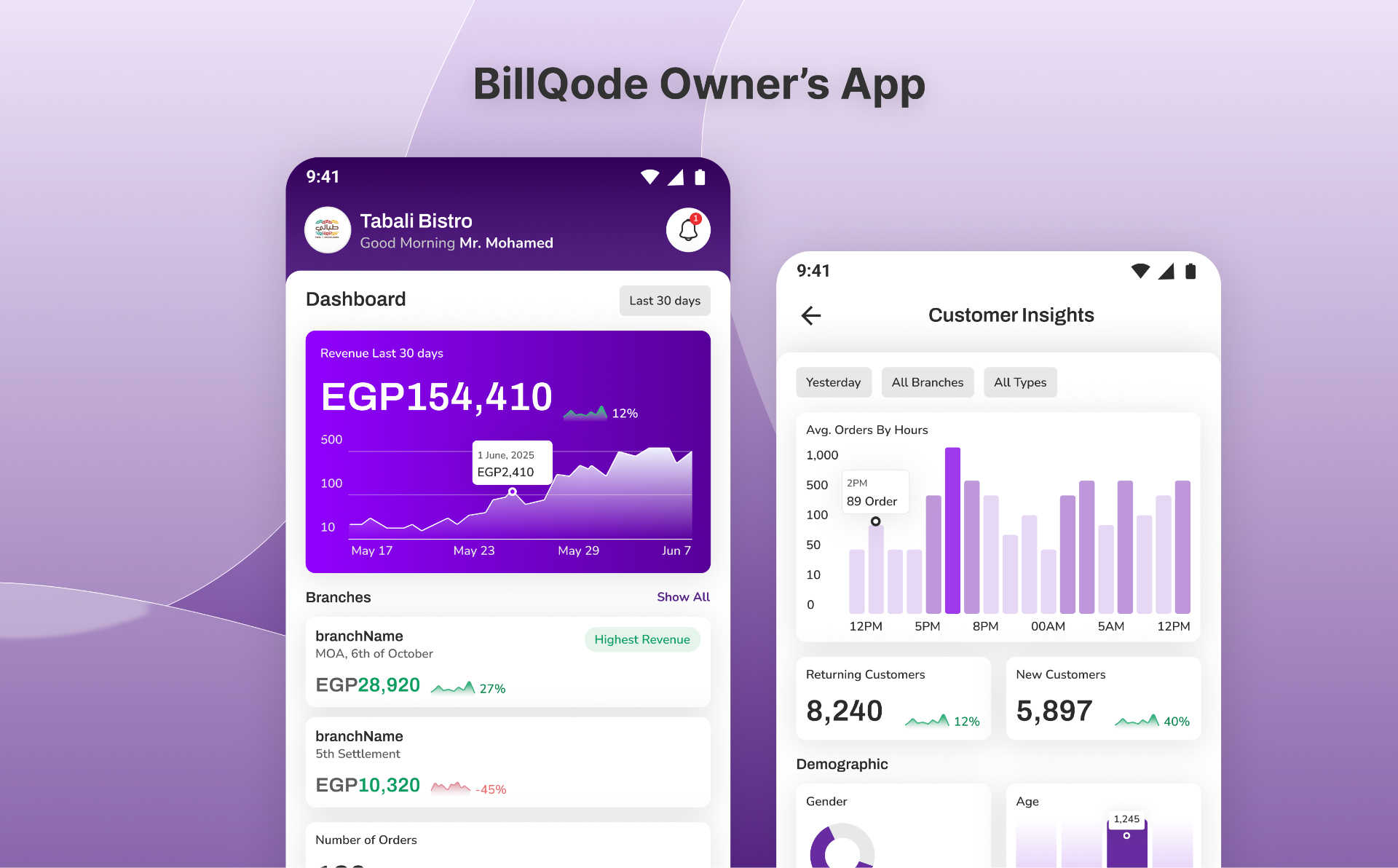
BillQode Owner's App — the business, in the palm of your hand.

02 · Problem

Owners read the business from spreadsheets.

Multi-branch operators typically piece together revenue from a POS export, customer signals from a WhatsApp group and menu performance from memory. By the time the picture is clear, the week is over.

The Owner's App collapses that reporting loop into a live surface — same numbers, same day, one thumb.

03 · Solution

Four verbs: Overview, Branches, Analytics, Manage.

The bottom bar mirrors how owners actually think about the business. Overview is the greeting. Branches is the ranking. Analytics is the ‘why’. Manage is the levers — vouchers, money tips, revenue and customer insights, one tap away.

  • OverviewRevenue trend, branch cards, orders, pickups and dropped orders — a daily pulse.
  • BranchesRanked cards with orders, revenue, trend and a Highest Revenue badge.
  • AnalyticsFilterable revenue, average visits, hourly distribution and payment-method insights.
  • ManageOperations, insights and configuration grouped by intent, not by feature.

04 · Data visualisation

Charts that fit the thumb.

Every chart is designed for a phone first — a purple gradient area chart for revenue, soft bars for hourly orders, a donut for gender split. Tooltips stay pinned rather than floating, so a one-handed tap surfaces the number without losing the trend.

05 · Outcome

The business, at a glance.

Owners now open the app before opening email. Revenue and branch comparisons that used to take a Monday morning huddle happen in a lift ride — and vouchers can be adjusted from the same screen that surfaced the drop.

Final screens

09 · tap a screen

Outcome

A calm, mobile-first analytics companion that turns four scattered reports — revenue, branches, customers and menu — into a single owner-friendly dashboard, with vouchers and settings one tap from the insight that triggered them.

Global reach

Shipped with teams across seven countries.

  • Egypt flagEgypt
  • Saudi Arabia flagSaudi Arabia
  • UAE flagUAE
  • Bahrain flagBahrain
  • Belgium flagBelgium
  • Türkiye flagTürkiye
  • Germany flagGermany