Index

12 · Logistics · Operations

FleetOpsFleetManagementDashboard

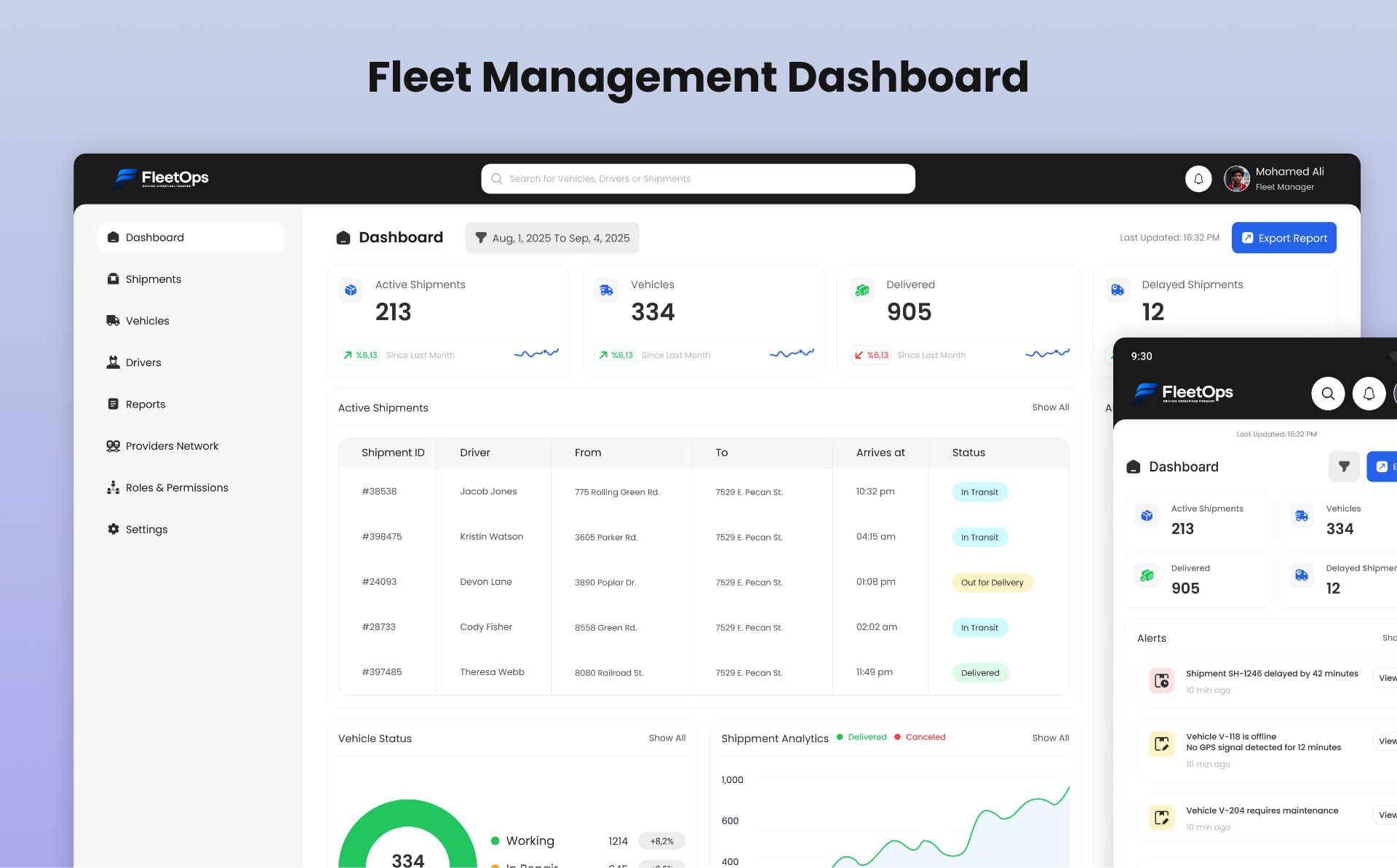
A centralized dashboard for operations managers to monitor fleet health, catch delayed shipments, and respond to alerts in real time — designed desktop-first with a touch-friendly mobile companion.

Client
Logistics Operator
Role
Senior Product Designer
Scope
UX Research · Information Architecture · UI Design · Design System · Responsive
FleetOps — Fleet Management Dashboard — cover image. Exception-based fleet monitoring, one glance deep.

Overview

A logistics operator needed a single dashboard so operations managers could understand fleet health in seconds, flag delayed or at-risk shipments, and respond to alerts before they hit delivery performance. The result is an exception-based interface designed desktop-first and reprioritised for mobile.

01 · The brief

Fleet health, understood in seconds.

Operations managers work in fast-paced environments where a missed alert becomes a missed delivery. The dashboard had to give an immediate read on fleet health, surface exceptions before totals, keep search and filtering always accessible, and work equally well as a desktop workspace and a mobile monitoring tool.

Fleet health at a glance

Understand overall status within the first few seconds, not screens deep.

Exception first

Delayed shipments, unavailable vehicles and critical alerts get visual weight over routine data.

Always searchable

Search and status filters stay pinned — core tasks never require navigation.

02 · Users

Two operators, one dashboard.

I mapped two primary users — an Operations Manager focused on individual shipments and vehicles, and a Regional Supervisor focused on high-level KPIs across fleets. Every layout decision had to serve both without compromising either.

Omar Hassan — Fleet Operations Manager

Needs immediate visibility into exceptions, not raw totals. Delayed shipments and vehicle issues deserve stronger visual emphasis, and scannability matters more than density.

Salma Adel — Regional Logistics Supervisor

Wants summary KPIs immediately visible and exceptions surfaced without deep investigation. Desktop is the primary workspace; mobile is for urgent updates.

03 · Product requirements

The features the dashboard had to answer for.

KPI summary

Active vehicles, active shipments, delayed shipments and delivered-today with clear deltas.

Active shipments table

A scannable list with status, driver, vehicle and ETA — filterable and searchable in place.

Fleet map & routes

A live overview of where the fleet is and where the exceptions are concentrated.

Vehicle status summary

Availability and operational status of the fleet, ranked by what needs attention.

Recent alerts

Time-ordered feed of the events managers must acknowledge or act on.

Responsive mobile layout

A companion experience that reprioritises essentials for one-thumb use.

04 · Design decisions

Exception-based monitoring, from desktop to pocket.

The desktop experience is built around a structured shipment table for efficient comparison and drill-down. The mobile experience isn't a shrunk desktop — it reprioritises essential information into touch-friendly cards so managers can act on critical alerts from anywhere without losing context.

Screens

03 · click to expand

Outcome

An exception-based fleet dashboard that gives operations managers fleet health in seconds, surfaces delays before they become failures, and carries the same status language from a full desktop workspace to a mobile monitoring companion.

Global reach

Shipped with teams across seven countries.

  • Egypt flagEgypt
  • Saudi Arabia flagSaudi Arabia
  • UAE flagUAE
  • Bahrain flagBahrain
  • Belgium flagBelgium
  • Türkiye flagTürkiye
  • Germany flagGermany